
Code Mode MCP: three calls for 12,000+ agent tools
How Code Mode keeps MCP context small while agents search, read, and execute actions across broad governed app workspaces.
By Weavz Team
The Model Context Protocol gives agents a common way to connect to external capabilities. That matters. It means an AI client can discover and call tools without every product inventing its own integration protocol.
But broad MCP servers create a real product problem.
A useful workspace can include Slack, Gmail, Google Sheets, HubSpot, Stripe, GitHub, Notion, browser tools, files, state, HTTP, and internal APIs. If every action appears as a separate tool with a full schema, the agent pays for that context before it even knows which action it needs.
That is not a prompt problem. It is an interface problem.
Code Mode changes the interface.
Short answer
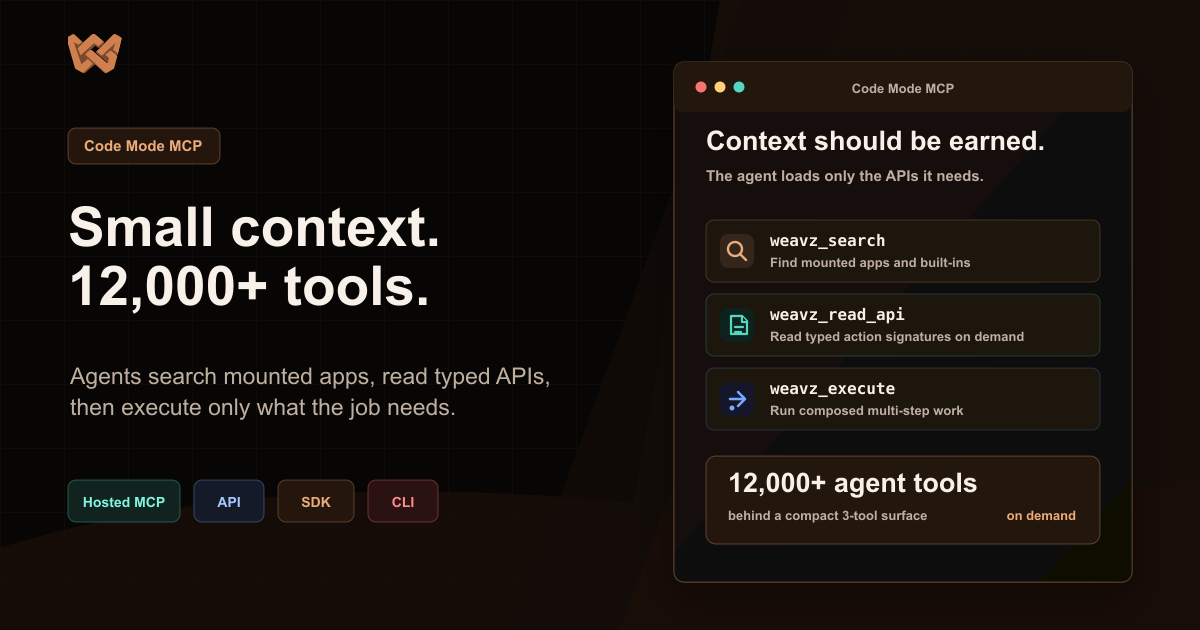
Code Mode is Weavz's context-efficient MCP mode for broad workspaces. Instead of exposing every integration action as a separate MCP tool, it exposes three meta-tools: weavz_search, weavz_read_api, and weavz_execute.
The agent searches for relevant aliases and actions, reads only the API declarations it needs, then runs code that calls the selected actions through weavz.*. The initial tool surface stays small while the workspace can still reach 1,000+ integrations and 12,000+ agent tools.
The problem with loading every tool first
Tool Mode is useful when a server should expose a small, fixed set of tools.
If an agent only needs support_slack__send_channel_message and support_github__create_issue, a flat tool list is simple. The model sees exactly what it can do.
The tradeoff appears when the workspace becomes broad.
A product operations workspace may need issue tracking, docs, GitHub, chat, spreadsheets, launch tracking, and files. A support operations workspace may need tickets, CRM, billing, Slack, email, approvals, and knowledge-base actions. A founder command center may need Gmail, calendar, spreadsheets, CRM, docs, chat, project tools, browser work, and durable state.
Loading every action schema upfront turns the model context into an integration catalog.
That is expensive. More importantly, it is distracting. The agent has to choose from many tools it will never use for the current task.
Code Mode matches how developers work
Most developers do not memorize every API shape before starting a task.
They search the available surface, open the relevant docs, inspect the exact parameters, and write the call.
Code Mode gives agents that same loop inside MCP:
weavz_search: discover aliases, apps, actions, and compact signatures.weavz_read_api: load detailed TypeScript declarations for the specific alias and action.weavz_execute: run JavaScript that calls the chosen actions through theweavz.*namespace.
The agent still has broad reach. The first message does not carry every schema.
A concrete example
Suppose a user asks:
"Build a weekly account summary, save the source packet, and send a Slack update if there are any blocked accounts."
The agent may need to:
- Search for CRM, support, Sheets, Slack, Filesystem, and State KV aliases.
- Read only the relevant actions: list CRM records, fetch support conversations, write a file, put a state key, and send a Slack message.
- Run code that pulls records, filters accounts, writes artifacts, stores state, and prepares the Slack summary.
- Pause at a Human Gate if the Slack send is configured for review.
In a flat tool mode, that may become a long chain of individual tool calls. Each call moves state through chat or hidden context. Each intermediate result may leak into the conversation.
In Code Mode, the agent can do the multi-step composition inside one execution. Files and state go into Weavz storage. The final reply can stay compact: what it searched, what APIs it read, what it wrote, what approval was needed, and where the artifacts live.
Three tools does not mean three capabilities
This point matters for search and for humans reading the docs.
Code Mode does not shrink the product's capability to three things. It shrinks the agent's starting interface.
The workspace can still include configured integrations, aliases, enabled actions, connection strategies, input partials, built-in persistence, browser tools, sandbox execution, and approvals.
The three meta-tools are the discovery and execution route through that workspace.
That is why Code Mode works well for AI clients such as Claude, ChatGPT, Cursor, Codex, and custom MCP hosts. The agent gets one compact MCP surface and can open the exact action detail only when needed.
Search, read, execute
The sequence is intentionally simple.
weavz_search answers the first question: what is available for this task?
The result should be compact. The agent needs enough to choose the right alias and action, not a full manual for every integration.
weavz_read_api answers the second question: what exact input shape does this action require?
This is where detailed typed declarations belong. The agent can inspect only customer_gmail.send_email, support_slack.send_channel_message, files.write_file, or whatever the task needs.
weavz_execute answers the third question: can the agent run the workflow?
The code execution can call multiple selected actions and transform data between them. Each integration call is still governed by the workspace configuration and execution layer.
Code Mode still needs governance
Context efficiency is not the same as safety.
An agent with a small interface can still perform high-impact actions if the workspace allows it. That is why Code Mode is tied to the same Weavz primitives as the rest of the product:
- Workspace integrations define what is mounted.
- Aliases define what agents call.
- Connection strategies decide which credentials are used.
- Enabled actions narrow the surface.
- Input partials set defaults or enforced values.
- Human Gates pause sensitive requests.
- Filesystem and State KV hold artifacts and checkpoints.
- Audit trails show what happened.
The agent discovers and executes through Code Mode, but the product still controls the action layer.
When Tool Mode is better
Code Mode is not always the right answer.
Tool Mode is cleaner when the server is narrow and intentionally static. If you are exposing three curated actions to a small assistant, individual MCP tools can be clearer and easier to inspect.
Use Tool Mode when:
- The server has a small, fixed surface.
- Every tool should be visible upfront.
- The agent does not need to compose multi-step code.
- You want the host's native tool picker to show exact actions.
Use Code Mode when:
- The workspace has many integrations or actions.
- The task crosses several systems.
- The agent needs to transform data between steps.
- The workflow benefits from files, state, or sandbox execution.
- You want the initial MCP context to stay small.
Most broad agent workspaces should start with Code Mode.
Why this matters when someone tries Weavz
The fastest way to understand Weavz is not to stare at a catalog of integrations. It is to connect a workspace to an AI client and ask the agent what is available.
In a starter workspace, the agent can search the mounted surface, read the API details it needs, and try a bounded workflow. It can write files, store state, inspect web pages, call apps you connect, and pause when a Human Gate requires approval.
That gives a more honest demo than a static list of 12,000 tools.
The point is not that Weavz has a large catalog. The point is that the catalog becomes usable from a small agent interface.
What builders can embed
SaaS builders can provision this from their own product.
A backend can create a workspace, add workspace integrations, connect users through Hosted Connect, create a Code Mode MCP server, and issue scoped access to an agent harness. The same product can use the REST API, TypeScript SDK, Python SDK, or CLI for setup, smoke tests, and backend jobs.
The user experiences the agent as a normal part of the product. The builder does not have to expose raw app credentials to the model or build a one-off connector stack for every workflow.
The real interface change
The old shape is:
"Here are all the tools. Choose one."
The Code Mode shape is:
"Search what is available. Read the API you need. Execute the workflow inside a governed workspace."
That is better aligned with broad agent work. It keeps context smaller, makes discovery explicit, lets actions compose, and leaves room for product controls around the work.
Related:
Share this article
Send it to a teammate or save the link for later.